Self-Drive Car Rental Fuel Policy: What Renters Need to Know
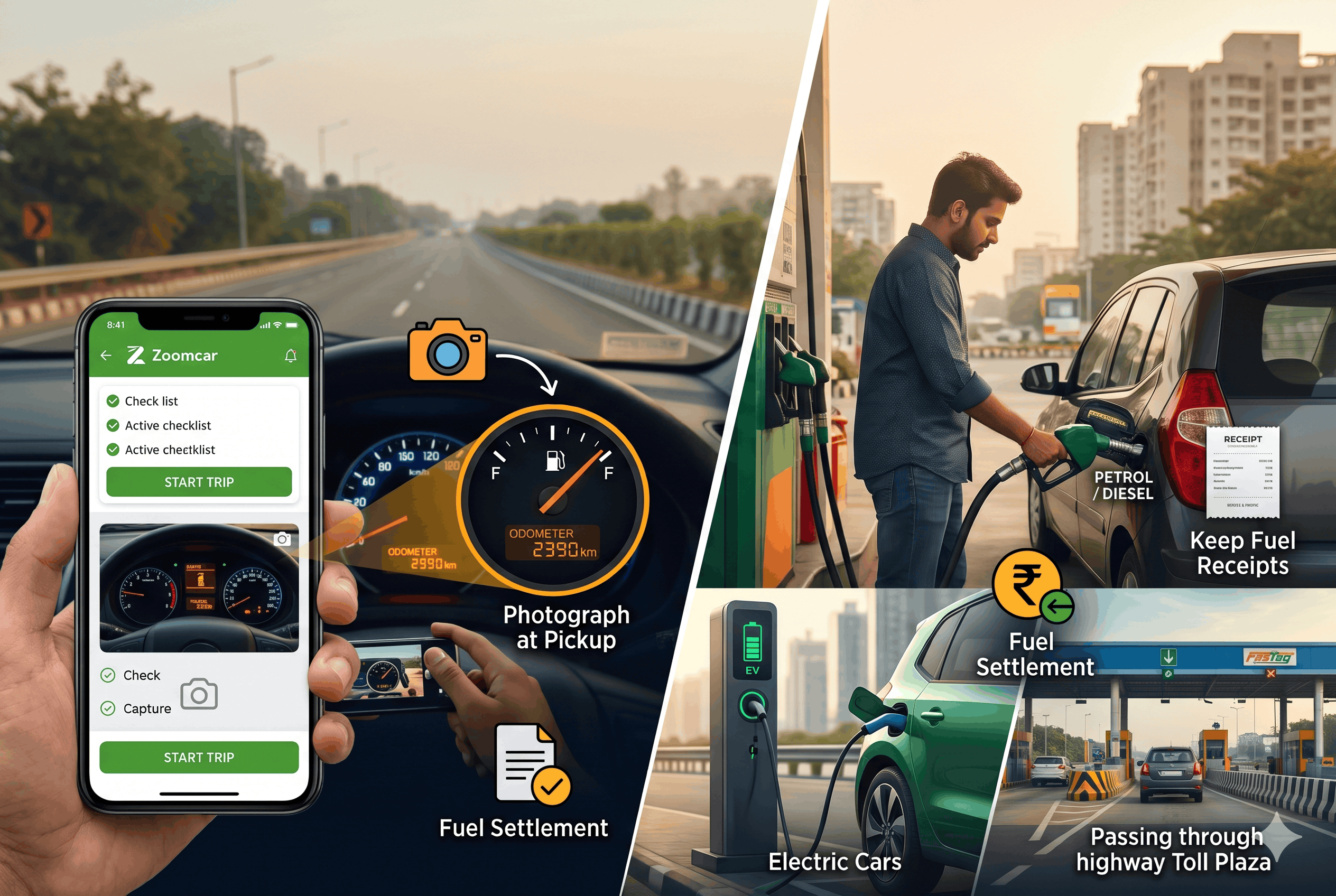
On a Zoomcar self-drive booking, fuel is something you manage during the trip. For bookings with limited free kilometres, Zoomcar’s Fee Policy says the car should be returned with a full tank. The fuel level at return is compared with the gauge reading at the start of your booking, and any difference is settled at the actual per-litre price. Your booking shows the terms that apply to the car you choose, so check them before you drive off.
This guide explains how fuel settlement works, what to record at pickup and drop-off, how Home Delivery handovers work, what to do after wrong fuelling, and how to approach fuel for electric cars, kilometre plans and tolls.
Quick Reference
1. How Fuel Settlement Works
The listed daily rate is the base rental price. Under Zoomcar’s Fee Policy, for bookings with limited free kilometres:
- The car should be returned with a full tank.
- If it comes back with more fuel than the gauge showed at the start of the booking, you are refunded the difference.
- If it comes back with less, you repay the refuelling charge.
- Both amounts are worked out the same way: actual cost of fuel per litre × the difference in litres.
For example, if you return the car 5 litres short of the pickup level and fuel costs ₹100 per litre, the refuelling charge works out to about ₹500. Five litres extra would be refunded at the same rate. This is only an illustration, and your booking shows the actual amounts.
Unlimited kilometre bookings are a separate booking type, and you can see which one you have while booking. Follow the fuel instructions shown for your booking.
Settlement and payment. Any amount you owe under the Fee Policy can be deducted from your security deposit, if one was taken. If the deposit does not cover it, the policy asks you to pay the balance electronically within 24 hours of the booking end time. Refunds go back to the original payment mode, and the Fee Policy lists a 5 to 15 day window for them.
2. At Pickup: Record the Starting Fuel Level
The starting reading is the baseline for any fuel difference, so record it before you drive away.
- Photograph the dashboard. Capture the fuel gauge and kilometre reading in one shot.
- Note the fuel type. The listing shows whether the car runs on petrol or diesel. Check the fuel flap for a sticker as well.
- Complete the start checklist. The checklist captures the fuel and kilometre readings with photos, so fill it in carefully.
- Ask about FASTag. Confirm how tolls and FASTag recharge work for your car before you set off.
3. Home Delivery: Handover Instructions
On Home Delivery bookings, Zoomcar’s Fee Policy says the car is delivered to the location you selected shortly before the booking start time, and picked up within 30 minutes of the booking end time.
- Check the fuel and kilometre readings at handover and photograph them, just as you would at a normal pickup.
- Start and end the trip through the app. Follow the prompts for each step.
- If you are asked for an OTP, check that it matches the step the app is showing, whether that is starting or ending the trip. If anything looks unclear, pause and contact support through the app before sharing it.
- Settle fuel and FASTag questions at handover. Ask the person delivering the car about the fuel level and how FASTag recharge works while they are with you.
- Mind the end-of-trip timing. Under the Fee Policy, extending a Home Delivery booking within 2 hours of its end time leads to cancellation of the doorstep collection, so request extensions early.
- You can end the trip early. The Fee Policy says you are not charged for ending the trip before the booking end time if the car has not yet been picked up.
4. Returning the Car: Refuel Before Drop-Off
Plan a refuelling stop near your drop-off point so the tank is full when you arrive. Photograph the gauge again at drop-off and keep your fuel receipt. If the gauge was not updated right after you refuelled, the receipt and a timestamped photo are your supporting record.
5. Wrong Fuel: What to Do
Putting petrol in a diesel car, or the other way round, can seriously damage the engine. Zoomcar’s Fee Policy says that where damage or a breakdown is the guest’s fault, the guest is liable for the cost of repair. The cause of a breakdown is decided from the repair workshop’s diagnosis report, so wrong fuelling may be treated as guest-caused. Your damage protection plan, if you opted for one, has its own terms, so check what it covers.
To avoid it:
- Check the fuel type on the listing and the fuel flap before you fill.
- Say “petrol” or “diesel” clearly to the attendant and watch the nozzle.
If it happens:
- Stop the attendant immediately. Do not let the tank fill further.
- Do not start the engine. Turning it on circulates the wrong fuel through the system. Switch off and leave the key out of the ignition.
- Contact Zoomcar support through the app and use the roadside assistance option in your booking if it is available.
- Do not drive the car to a workshop. Have it towed.
- Keep records. Save the fuel receipt, photos of the pump and the gauge, and your support ticket details.
6. Electric Cars: Charge Instead of Fuel
The petrol and diesel settlement above is written for fuel. If you book an electric car, do not assume the same per-litre calculation applies to charge.
- Check your booking for the charging instructions that apply to that car.
- Record the battery percentage and estimated range with a photo at pickup and again at drop-off.
- Ask about the charger. Confirm which charging connector and which networks suit the car before you rely on a particular station.
- Plan charging stops for longer routes so you do not arrive at the drop-off with a very low battery.
- Ask support if the booking is unclear about how charge is treated at return.
7. Plan Your Fuel Budget
Fuel is often one of the larger costs on a longer trip, so estimate it before you book.
- Work out the route distance, including local driving at your destination.
- Divide it by the car’s likely mileage to get the litres needed.
- Multiply the litres by the current fuel price.
For example, a 300 km trip at about 15 km per litre needs roughly 20 litres, which at ₹100 per litre comes to about ₹2,000. Mileage drops with heavy AC use, hill roads, a full load and stop-and-go traffic, so add a margin. On remote highways, fuel stations can be far apart, so refuel before the tank gets low.
8. Kilometre Plans and Fuel
Your kilometre plan affects both fuel use and total cost. Free kilometres depend on the hours booked and the plan you choose, and any excess kilometres are charged at a fixed per-kilometre fee shown at booking. Unlimited kilometres apply only to bookings that offer them. Match the plan to your route so you do not pay extra for distance you did not plan on. Our guide on how to rent a self-drive car in India explains how to compare cars and kilometre plans before you book.
9. Tolls and FASTag
Tolls are separate from fuel but part of the same running cost. Under the guest policy, tolls are paid by the guest when they are due. Zoomcar’s support information says the guest recharges the FASTag according to their usage, and the host provides the tag details for recharging. Any FASTag balance matter after the trip is settled between the guest and the host, so ask how it works for your car before you leave.
10. Tips to Avoid Fuel Disputes
- Take photos at both ends. The gauge and kilometre reading at pickup and drop-off are your strongest record.
- Keep fuel receipts. They show what you paid and when.
- Complete the checklists. The start and end checklists capture fuel and kilometre readings.
- Report issues in the app straight away. Use Help & Support in your booking so the problem is on record, and attach your photos.
- Check your booking terms. They apply to your trip. Our road trip packing checklist covers other pickup checks.
FAQs
Is fuel included in the rental price? The listed rate is the base rental. Fuel is generally managed by you during the trip, and your booking shows the terms for the car you select.
How is a fuel refund or refuelling charge calculated? Both use the same formula: actual cost of fuel per litre × the difference in litres between the start and end of the booking.
What if I return the car with a different fuel level than at pickup? Any difference is settled per litre, as explained in Section 1. Your photos and receipt help support your case if there is a question.
Is there a kilometre limit? It depends on the plan you chose. Your booking shows the free kilometres and the fee for excess kilometres.
What should I do if I fill the wrong fuel? Follow the steps in Section 5: do not start the engine, and contact support through the app.
Who pays for tolls? The guest, when they are due. See Section 9 for how FASTag works.
Conclusion
Fuel is simple to manage when you handle it at both ends of the trip: record the starting level, fill the right fuel, return the car as your booking requires, and keep your photos and receipts. Use the app for handovers and for anything that goes wrong, and add tolls and kilometre limits to your budget.
Ready to plan your trip? Search cars and book your self-drive car rental in India.